


1 / 7


HAVIT Gaming Mouse MS1029 RGB Backlit
Product Highlights
- GAMING-GRADE SENSOR: Enables fast and precise targeting for professional-level gameplay.
- ADJUSTABLE DPI: Six settings from 1200 to 7200 DPI for precise speed control.
- DYNAMIC RGB LIGHTING: Vibrant backlit effects create an immersive gaming atmosphere.
- FORWARD/BACKWARD BUTTONS: Dedicated keys for easy web browsing and in-game commands.
- ERGONOMIC DESIGN: Contoured shape ensures a comfortable grip during marathon gaming sessions.
- DURABLE CONSTRUCTION: Main buttons rated for 5 million clicks for long-term reliability.
- PLUG-AND-PLAY: USB interface with a 1.5-meter cable for simple, wired connectivity.


| Category | Specification |
|---|---|
| Interface Type | USB |
| Key Number | 6 |
| Resolution | 1200-1800-2400-3600-4800-7200DPI |
| Operating Voltage | 5V±10% |
| Operating Current | 100mA |
| Key Life | 5,000,000 times |
| Cable Length | 1.5m |
| Product Weight | 127g |
| Size | 128*66*41mm |
Is the MS1029 mouse compatible with my PC or laptop?
Yes—this HAVIT gaming mouse connects via USB and works plug-and-play with virtually any desktop or laptop computer running Windows, macOS, or Linux.
Can I adjust the sensitivity on this mouse for different types of games?
Absolutely—you get six DPI presets ranging from a snappy 1200 all the way up to a blistering 7200 DPI. Lower settings give you precision aiming for FPS games, while higher sensitivities let you whip across multiple monitors quickly.
How comfortable is thismouse during long gaming sessions?
The ergonomic contoured shape fits naturally in your hand with a balanced weight distribution at just 127 grams—light enough for fast movements but substantial enough that it won't feel flimsy during extended play.
Will the buttons hold up if I click really frequently over time?
The main left and right buttons are rated for an impressive five million clicks—that's serious durability built-in. This thing will outlast countless hours of competitive matches before you'd ever notice any degradation.
What extra buttons does this mouse have besides left and right click?
You get two side拇指buttons positioned perfectly within reach—these default to forward and backward functions for easy web browsing but can also be remapped in-game macros depending on what game you're playing.

Compare with other HAVIT models
Key specs side by side
| Specification |
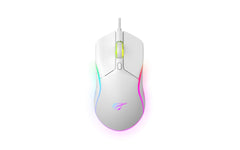 MS1029
This model MS1029
This model
|
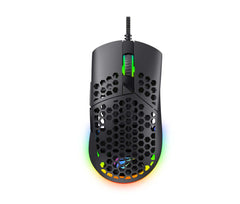 MS1036
View details → MS1036
View details →
|
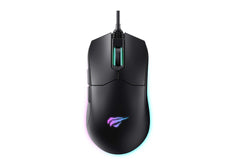 MS1014
View details → MS1014
View details →
|
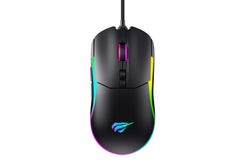 MS1020S
View details → MS1020S
View details →
|
|---|---|---|---|---|
| Weight | 127 g | 83 g | 125 g | 125 g |
| Buttons | 6 | 7 | 7 | 7 |
| Switch life | 5,000,000 times | 3,000,000 times | 5,000,000 times | 5,000,000 times |
— indicates specification information is not currently listed.